The third castle round tower I built looked exactly like the first two — sort of round, sort of leaning. A 13-block ring isn’t hard; mirror four quarters off the center and it falls into place. What gets you is everything around it: which diameter for this part of the castle, whether a spiral staircase fits inside, how thick the walls should be, how to cap the top without it looking like a chimney. None of that gets decided by counting pixels off a 2D chart.
Table of contents
Open Table of contents
- Round towers fail at the planning step, not the building step
- Laying out a round castle before you size the towers
- Diameter — pick by what the tower has to do
- Odd vs even — the spiral staircase question
- Wall thickness — when to go 1, 2, or 3 blocks deep
- Round tower roofs — the silhouette decision
- Ellipse towers — the château side wing trick
- Connecting multiple towers along a curtain wall
- The tower I built that actually worked (and the one I tore down)
- Start with the diameter, not the blueprint
Round towers fail at the planning step, not the building step
Tower tutorials almost always skip the part that breaks the build. They show you the perfect 11-block ring, then jump to “stack it 20 blocks tall.” Skipped: why 11 and not 13, whether a spiral staircase will fit, how the walls join the curtain wall, and what the top is actually going to do.
A 2D circle chart can’t answer any of that. It’s a flat snapshot of one layer, and a tower lives or dies on five decisions: diameter, parity (odd vs even), wall thickness, roof type, and how it connects to other towers. The foolproof method for the circle itself is one chapter. This guide is the other four — starting one step further out, with where the towers go at all.
Laying out a round castle before you size the towers
“Round castle” covers two different builds. Worth settling which one you’re after before anything gets placed.
The first is a castle whose curtain wall is itself one giant circle, towers spaced around the ring. The second is an ordinary castle — square, or sprawling and irregular — that happens to use round towers at its corners. History mostly built the second, since a ring wall wastes defensive frontage. Minecraft mostly builds the first, because a clean circle reads as deliberate in a way a rectangle never does.
If you’re going for the ring, wall diameter is the decision everything else hangs off, and it tells you how many towers you need before you place one. Circumference is πD, and flanking towers sit 30-50 blocks apart:
| Ring wall diameter | Circumference | Flanking towers |
|---|---|---|
| 60 | ~188 | 4-6 |
| 80 | ~251 | 5-8 |
| 120 | ~377 | 8-12 |
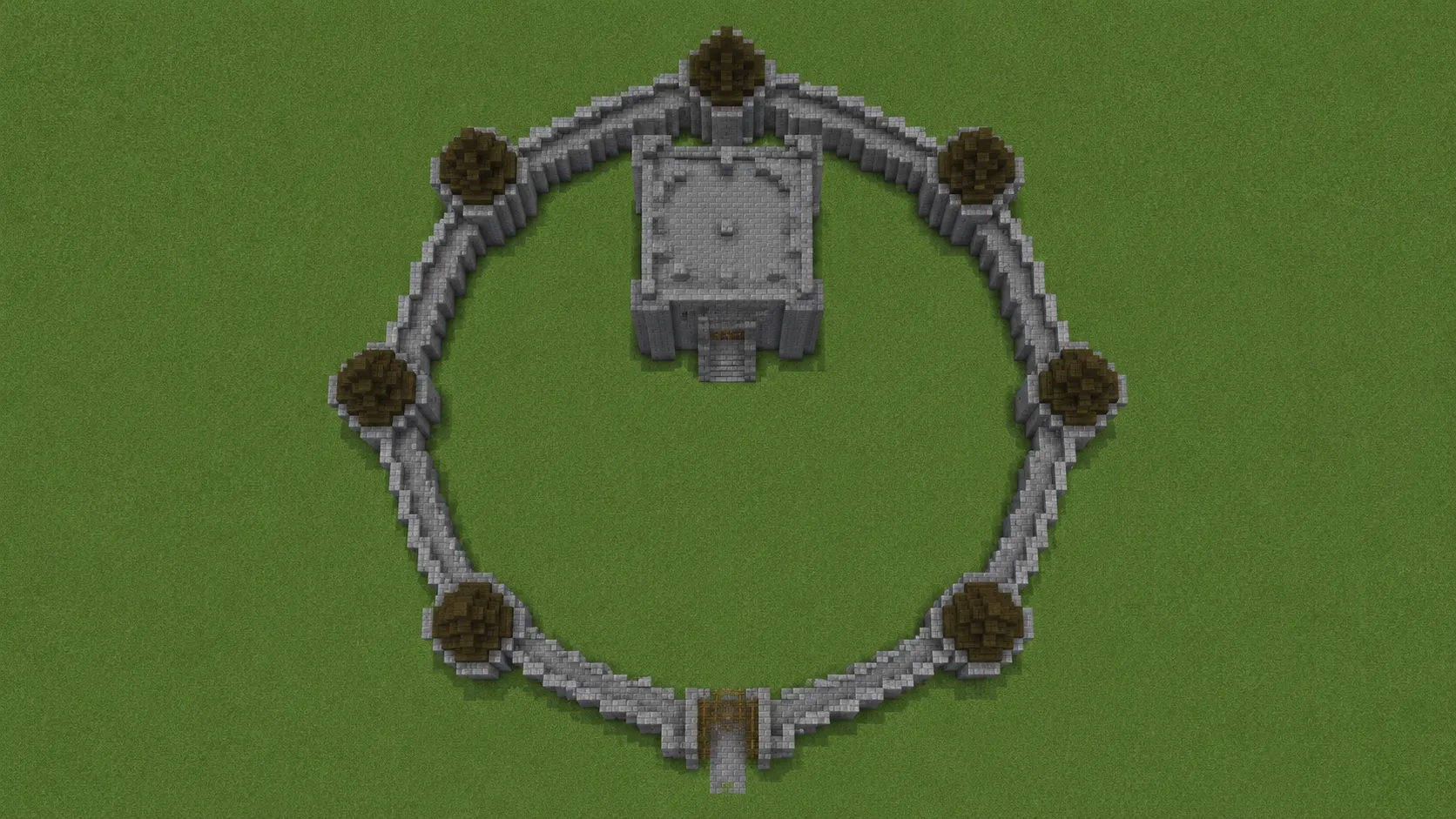
A 120-diameter ring means 377 blocks of curtain wall. That is the number most people skip past when they picture a round castle — the towers are the fun part, and the wall between them is where the project quietly dies at 60% done.
The circle generator handles rings this large — set Diameter to 80 and the Materials panel gives the per-layer block count for the whole wall footprint before you commit to walking it.
Where the keep goes I’m still not settled on. Dead center is the obvious answer and it looks ceremonial, almost like a bullseye. Offset toward the back third leaves a real courtyard in front and reads more like somewhere people actually lived. I’ve built both. The off-center one was better to walk around and worse to look at from outside the wall, which is not a tradeoff I’ve figured out how to resolve.
Layout tells you a 13-diameter tower belongs at the northeast corner. It doesn’t tell you what that tower looks like — which blocks, where the windows land, how the roof meets the wall. That is what the AI build generator is for: describe the tower in a sentence and it returns a 3D structure plus a .mcfunction you can drop straight into the world, no mod needed. One limit to know going in — it is tuned for single structures around a 15-25 block footprint, so it will design you a tower, not a castle. Let it handle one tower, then place the rings and the wall yourself.
Diameter — pick by what the tower has to do
There’s no universal “best” round tower diameter. There’s the right diameter for the job.
Watchtower or corner tower — 9 to 11 blocks
Small, fast to build, easy to defend. The 9-ring barely reads as round, so 11 is the safer floor. A 9-block interior gives you ~2-block walking space after wall thickness — fine for a guard post, cramped for anything else.
Flanking tower along a wall — 11 to 13
The classic medieval setup: identical towers every 30-50 blocks along a curtain wall. 11 sits on a thin wall well; 13 lets you embed a doorway naturally without notching the wall.
Wizard or mage tower — 13, very tall
Wizard towers are usually slim and tall — the fairy-tale silhouette. Diameter 13 keeps the proportions right at 30-40 blocks of height. Wider and the spire feel disappears; narrower and you can’t fit a usable interior.
Castle keep or main hold — 15 to 21
The big central tower needs a real interior. 15 fits a true spiral staircase plus a usable room around it. 21 gives you room for throne-hall geometry without the keep feeling like a barrel.
Standalone lighthouse — 7 to 10
Smaller than a keep, taller than a watchtower, single-purpose. 7 is the smallest diameter that still reads round in isolation against open water or sky.
Open the circle generator at any of these diameters and the Materials panel shows the per-layer block count and total stacks before you commit. That’s the check that kept me from picking 17 for a flanking tower and discovering halfway through it didn’t match my curtain-wall spacing.
Odd vs even — the spiral staircase question
Diameter parity decides one specific thing: whether a spiral staircase fits naturally inside.
An odd diameter (9, 11, 13, 15, 17, 21) gives you a true center block on every layer. That center block is the column your spiral staircase wraps around — place one stair adjacent to the column, rotate 90°, climb one, repeat. The geometry just works.
An even diameter (10, 12, 14, 16) gives you a 2×2 center instead. There’s no single block to anchor a staircase column to. You can build around it (offset the central pillar to one of the four center blocks, or use a double-helix design), but you’re working harder for the same result. The Beacon Rule comparison in the sphere block count guide covers the parity tradeoffs in more depth.
For even diameters, the use cases are narrower — double-door entrance, a 2-block-wide cardinal axis through a courtyard. Pick odd by default for any tower with interior stairs.
Wall thickness — when to go 1, 2, or 3 blocks deep
A real medieval tower wall is 2-3 blocks thick. In Minecraft that’s a tradeoff against interior space.
Diameter 9-11: stick with 1-block walls. The interior is already tight; eating two more blocks for a thicker wall leaves no room to stand inside.
Diameter 13-15: 2-block walls become possible. This is where towers start looking real — and where you can embed a spiral staircase inside the wall itself, the way historical castles handled it. Interior drops by 4 blocks total but reads as a proper fortress.
Diameter 17+: 3-block walls work if you’re building a keep meant to feel impregnable. At 21 with 3-block walls you still have a 15-block interior — plenty for a great hall.
One thing the generator can’t choose for you: which face of the wall the staircase eats into. Lay the base ring, count interior blocks both ways, decide where the door sits, then commit to the layout before stacking the next layer.
Round tower roofs — the silhouette decision
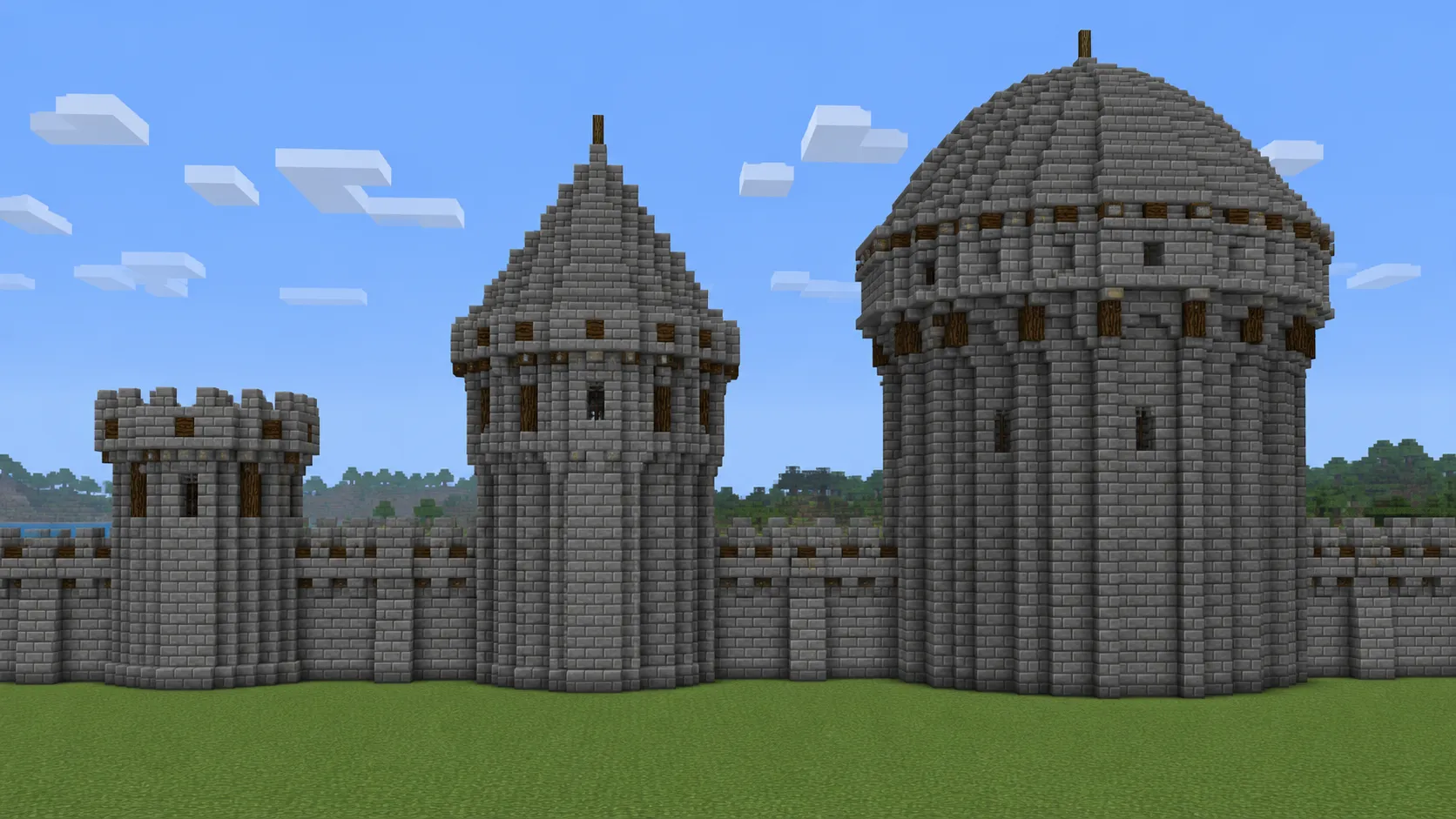
A round tower’s silhouette is its roof. Four castle tower roofs that hold up:
Battlement flat top
The simplest finish: cap the tower with a 1-block walkway and crenellated edges (alternating air gaps every 2 blocks). Works for watchtowers and curtain-wall flanking towers — the build that says “this is a fortification.”
Conical tapered roof
The wizard / fairy-tale silhouette. Stack circles of decreasing diameter to taper the cone: a 13-base roof might step 13 → 11 → 9 → 7 → 5 → 3 → 1 over 6-7 layers. The circle generator at each step gives you the exact ring without you eyeballing the taper.
Dome roof
The big-keep or basilica look. A dome cap is a sphere stopped at the hemisphere, scaled to the tower’s diameter. The dome generator lays it out ring by ring with the exact block count for each — no guessing where the curve has to step inward.
Onion dome
The Eastern European / Russian Orthodox church silhouette. Build the dome wider than the tower at the equator (D+2 or D+4), then taper it back down to a spire. Niche, but utterly distinct from the other three — and almost no Minecraft tower guide covers it.
There is no dedicated castle roof generator here, and I’m not convinced one would earn its keep — the two roofs that actually need precision are already covered. A conical roof is a stack of shrinking circles, so the circle generator hands you each ring exactly: 13 → 11 → 9 → 7 → 5 → 3 → 1. A dome roof is a hemisphere scaled to the tower diameter, laid out ring by ring by the dome generator. Battlements and onion domes get hand-placed either way. No generator is going to guess where you want the crenellation gaps.
Ellipse towers — the château side wing trick
Round towers are isotropic: diameter is the same in every direction. That’s the default and it’s right for most builds.
But European châteaux (think Loire Valley Renaissance castles) often use oval flanking towers — longer along the wall than away from it. The silhouette reads as a stretched cylinder, not a fat one. It’s an underused look because most circle generators only do true circles.
On the oval generator, Width and Height are already separate — it even opens on 17×11, which is the ring you want here. That ellipse is symmetrical along both axes, with the longer dimension running parallel to your curtain wall. Stack that ring 20 blocks tall and you have a château flanking tower.
I built one along a 90-block wall last month and it instantly read “Loire Valley” rather than “generic medieval” — same height as my round towers next to it, completely different feel.
Connecting multiple towers along a curtain wall
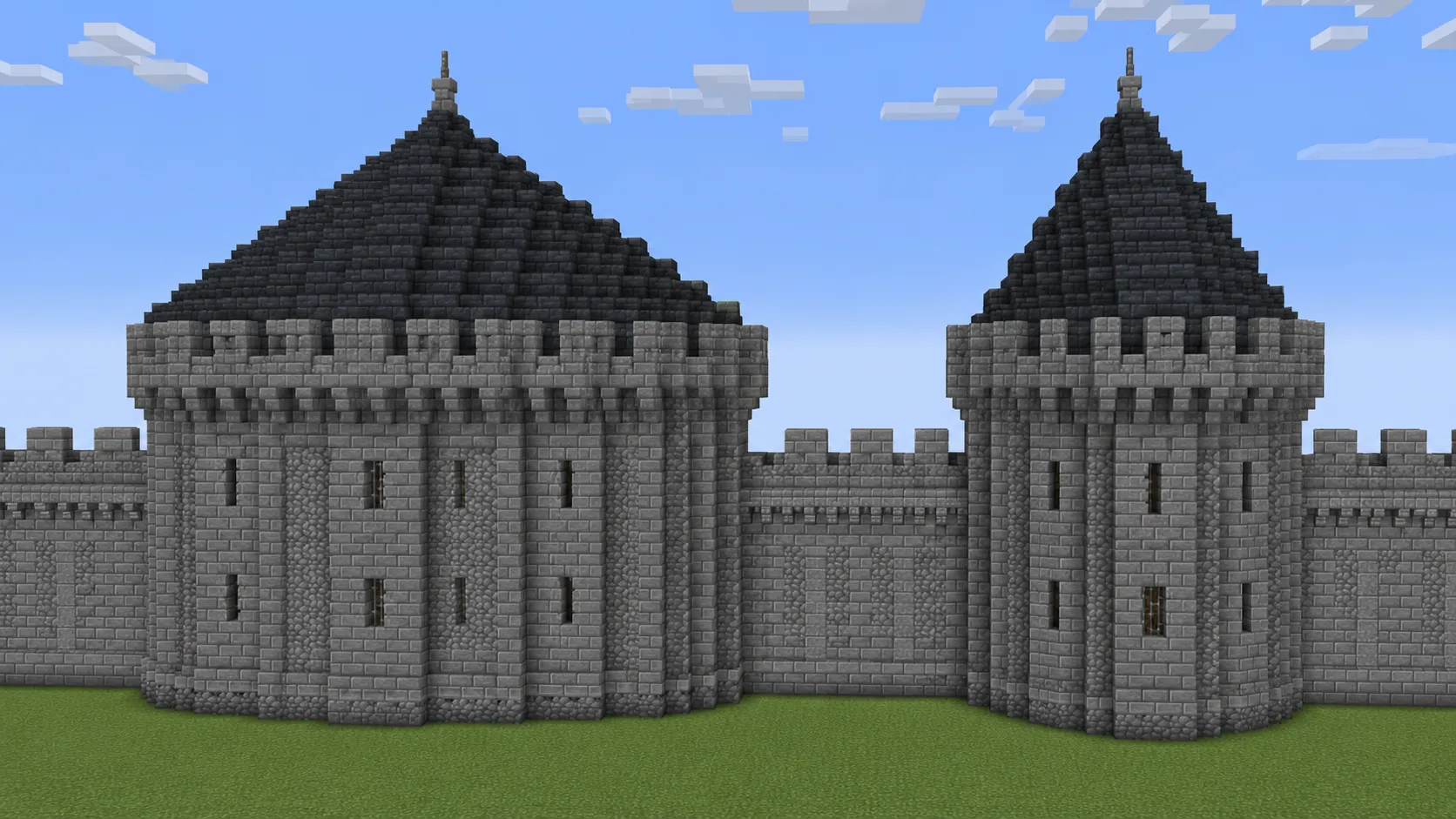
Most round towers don’t stand alone. They sit at the corners and along the length of a curtain wall, and the moment you place a second one, alignment matters.
The first tower is easy: place it, build it. The second has to land at the right distance — typically 30-50 blocks along the wall — and align so the wall hits the tower at the right angle. Eyeballing this gives you a wall that grazes the tower at a tangent, looking deflated.
The axis alignment method handles this cleanly: drop a center anchor for each tower first, then project axes outward, then connect the walls between matched axis points. You’re connecting anchor points rather than tracing a perimeter blind — the same approach a castle architect would use, anchor first, edges last.
A 15-diameter keep with 2-block walls plus four 11-diameter flanking towers on a 120-block wall runs roughly 3,200 blocks for the towers alone, before any roofs. The same per-layer formula a sphere uses carries over to towers — a round tower is just a stack of identical circle rings, so the Materials panel total scales linearly with height.
The tower I built that actually worked (and the one I tore down)
Last month I built a 5-tower castle wall on a single creative test world. The corner towers were 15-diameter keeps with 2-block walls and dome roofs. The three flanking towers were 11-diameter with 1-block walls and battlement tops. The wall ran ~120 blocks total.
Four of the five came out right. The fifth — a flanking tower I built before opening the generator — was the disaster. I’d eyeballed an 11-block ring, miscounted on the third quarter, and didn’t notice until I started the roof. The whole tower was leaning 1 block southeast. Torn down, rebuilt from the generator’s exact ring. The second attempt was straight; the roof still has a 1-block notch on the south side I never bothered to fix.
The check that would have saved that hour: laying out the base ring with the highlight-center axes on and building one quarter at a time. Even on an 11-block ring, eyeballing fails predictably.
Start with the diameter, not the blueprint
Skim every round-tower guide online and they all start with “build a 13-ring base.” That’s the easy part. Starting with diameter forces you to answer the harder questions first: what’s this tower’s job, who climbs the stairs, how does it sit next to its neighbors, what silhouette does it cast against the skyline?
Pick the answer to those, then open the circle generator and dial Diameter to match. The ring is the last decision, not the first.